Database Connection Pooling: PgBouncer, PgPool, and Beyond
A deep dive into connection pooling modes, pool sizing formulas, PgBouncer vs PgPool-II architecture, and the failure modes you'll hit under load.

Akhil Sharma
February 27, 2026
Database Connection Pooling: PgBouncer, PgPool, and Beyond
Every PostgreSQL connection costs ~5-10MB of memory and a forked process. At 500 connections, that's 5GB of RAM just for connection overhead. Application servers with 50 instances and 20 connections each create 1,000 connections — enough to overwhelm most database servers. Connection pooling puts a multiplexer between your application and the database, allowing thousands of application connections to share a small pool of database connections.
Why You Need a Pooler
Without a pooler, each application thread holds a dedicated database connection for the entire duration of the request, even during non-database work (calling external APIs, rendering responses, sleeping). The utilization rate of these connections is typically 5-20% — they're idle 80-95% of the time.
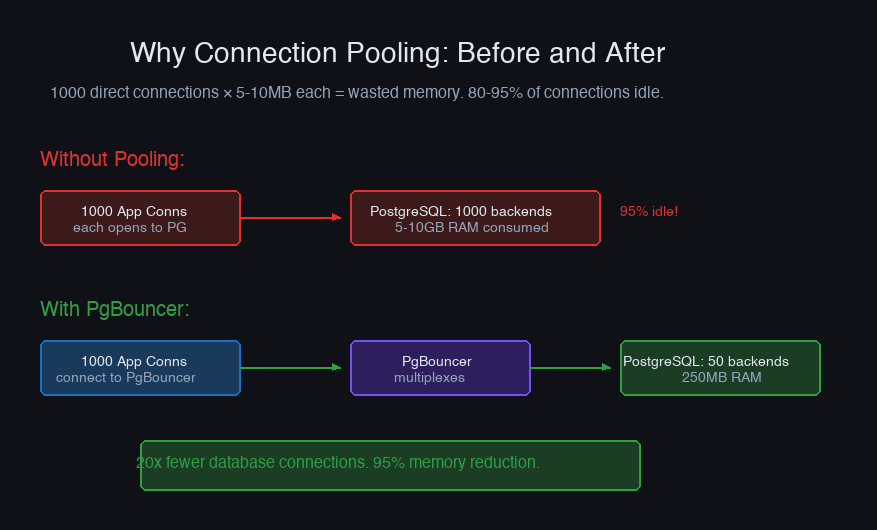
A pooler reclaims idle connections and reassigns them. One hundred database connections can serve 2,000 application connections if requests don't all hit the database at the same moment.
Pooling Modes
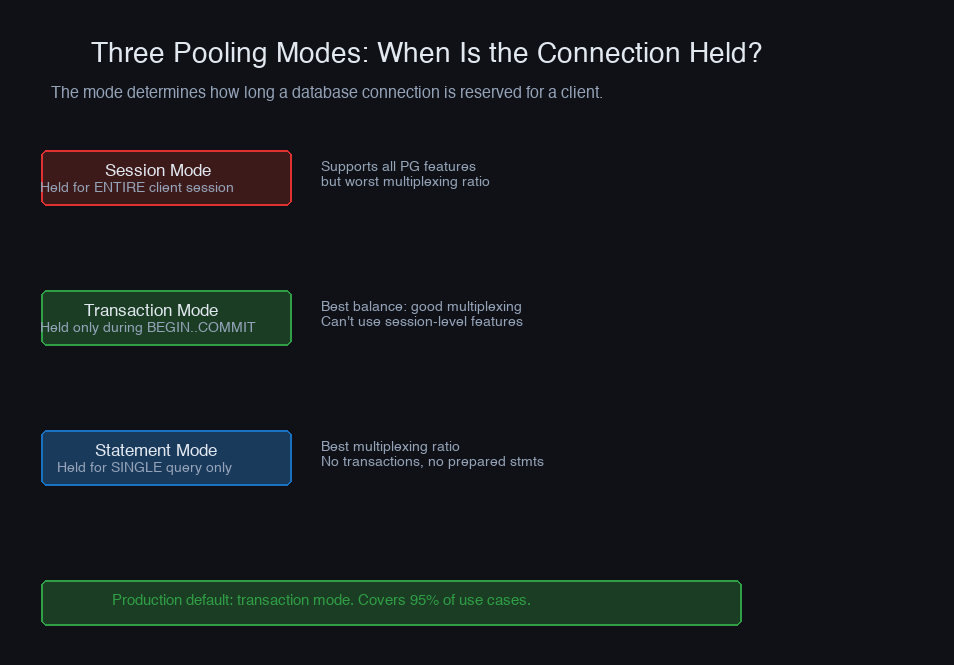
The pooling mode determines when a database connection is released back to the pool.
Session Pooling
A database connection is assigned when the client connects and released when the client disconnects. This is effectively just connection sharing across different client sessions over time — but while a client is connected, it owns the database connection exclusively.
Use when: Your application uses prepared statements, SET commands, advisory locks, or LISTEN/NOTIFY that require connection affinity.
Limitation: If clients hold long-lived connections (connection pools within the application), you get minimal benefit. The pooler just moves the bottleneck.
Transaction Pooling
A database connection is assigned at BEGIN and released at COMMIT or ROLLBACK. Between transactions, the connection goes back to the pool.
Use when: Most production workloads. This gives the best multiplexing ratio.
Limitations: Session-level state doesn't persist between transactions. This breaks:
SETcommands (e.g.,SET search_path)PREPARE/EXECUTE(prepared statements, though PgBouncer 1.21+ supports these)LISTEN/NOTIFY- Advisory locks
- Temporary tables
Workaround for SET commands: Use SET LOCAL (transaction-scoped) instead of SET (session-scoped):
Statement Pooling
Connections are released after each individual statement. Most restrictive — no multi-statement transactions allowed.
Use when: Read-heavy workloads with only simple single-statement queries. Rare in practice.
PgBouncer vs PgPool-II
PgBouncer
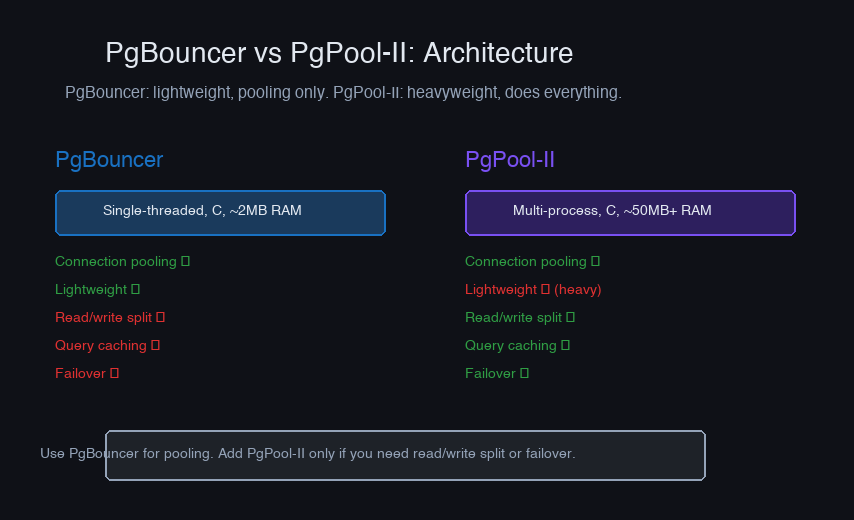
Single-threaded, event-driven proxy. Does one thing (connection pooling) and does it well.
Advanced System Design Cohort
We build this end-to-end in the cohort.
Live sessions, real systems, your questions answered in real time. Runs only once every few months — join the waitlist for the next cohort.
Strengths: Extremely lightweight (~2MB memory for 1000 connections), low latency overhead (~0.1ms), battle-tested at scale (used by GitLab, Heroku, Supabase).
Weaknesses: Single-threaded — one PgBouncer handles ~10K connections on modern hardware. For more, run multiple instances. No query routing, load balancing, or caching.
Configuration:
PgPool-II
Multi-process proxy with connection pooling, load balancing, query caching, and automatic failover.
Strengths: Read/write splitting, automatic failover, query result caching, watchdog for health checks.
Weaknesses: Higher resource consumption (multi-process architecture), more complex configuration, higher per-query latency overhead than PgBouncer, query caching rarely works well in practice.
When to Use Which
| Criteria | PgBouncer | PgPool-II |
|---|---|---|
| Primary goal | Connection pooling only | Pooling + HA + load balancing |
| Memory overhead | ~2MB | ~50MB+ |
| Latency overhead | ~0.1ms | ~0.5-1ms |
| Read/write split | No (use app-level routing) | Built-in |
| Failover | No (use Patroni/repmgr) | Built-in |
| Complexity | Minimal | Significant |
My recommendation: Use PgBouncer for pooling and a separate tool (Patroni, repmgr) for HA/failover. Composing focused tools gives you better reliability than one tool that does everything.
Pool Sizing
The most common mistake is making the pool too large. More connections ≠ better performance. Past the optimal point, connections compete for CPU, locks, and I/O — throughput drops while latency increases.
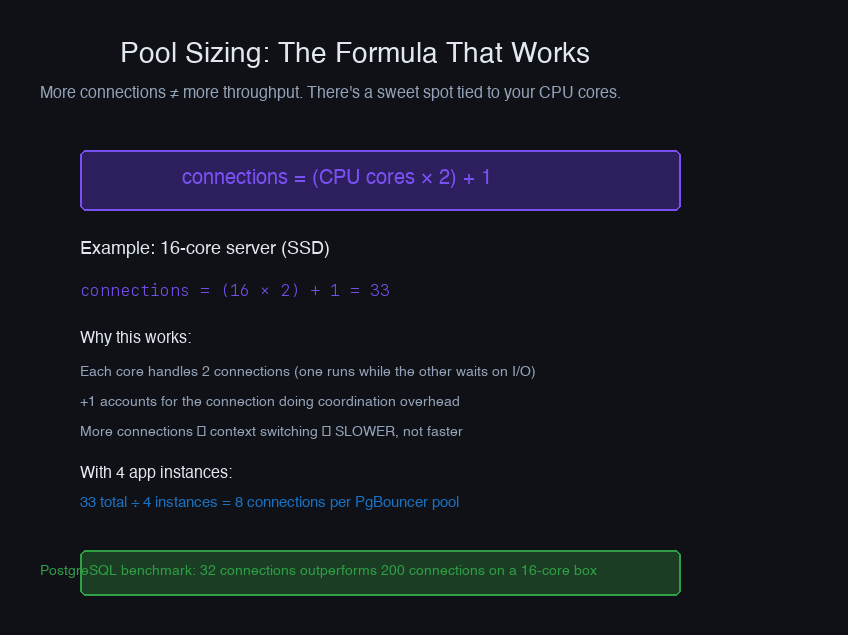
The formula (from the PostgreSQL wiki):
For SSD storage (no spindles), use:
A 16-core database server with SSDs should have ~33 connections in the pool. That's the total across all PgBouncer instances — if you have 3 PgBouncer instances, each gets a default_pool_size of 11.
Per-database pools: PgBouncer creates a separate pool per database. If your application connects to 3 databases, you need total_pool / 3 per database.
Monitoring
Key metrics to watch:
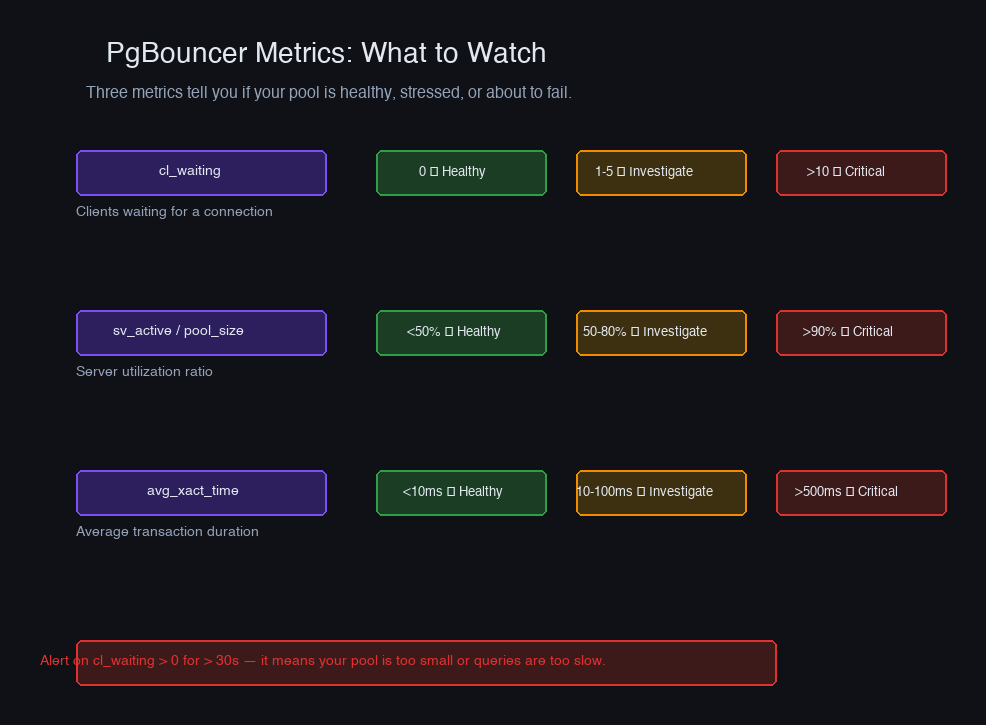
Red flags:
| Metric | Healthy | Investigate | Critical |
|---|---|---|---|
| cl_waiting | 0 | 1-10 | > 10 |
| sv_active / pool_size | < 0.7 | 0.7-0.9 | > 0.9 |
| avg_xact_time | < 50ms | 50-200ms | > 200ms |
When cl_waiting is consistently > 0, clients are waiting for a database connection. Either increase the pool size (if the database can handle it) or optimize slow queries that hold connections too long.
Failure Modes Under Load
Connection exhaustion. All pooled connections are active, new requests queue. Symptoms: increasing latency, timeout errors. Fix: identify and kill long-running queries, increase reserve_pool_size for burst headroom.
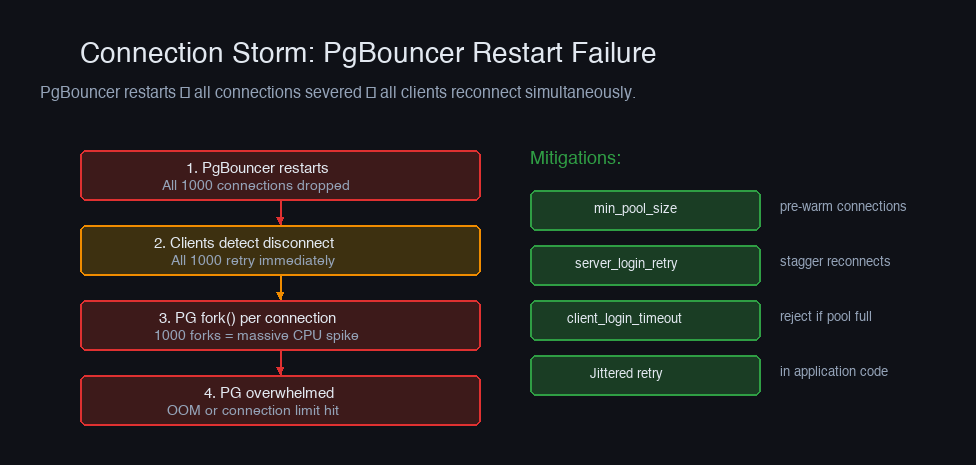
Connection storm after restart. PgBouncer restarts, all connections are severed, all clients reconnect simultaneously, overwhelming PostgreSQL with connection setup. Mitigate with min_pool_size (pre-create connections at startup) and client-side connection retry with jitter.
Prepared statement errors in transaction mode. Application uses prepared statements, PgBouncer returns the connection to the pool, another client gets the connection and tries to use a prepared statement that doesn't exist. Solution: upgrade to PgBouncer 1.21+ with max_prepared_statements support, or disable prepared statements in your ORM:
DNS resolution caching. PgBouncer resolves the database hostname at startup. If the IP changes (RDS failover, DNS-based load balancing), PgBouncer keeps connecting to the old IP. Set dns_max_ttl = 30 to force periodic re-resolution.
Connection pooling is infrastructure you set up once and rarely think about — until it breaks. The key decisions are pool mode (transaction for most workloads), pool size (smaller than you think), and monitoring (watch cl_waiting like a hawk). Get these right and your database connections stop being a bottleneck.
More in System Design
Building a Distributed Job Scheduler
Why single-node job schedulers silently fail in production, and how to build a distributed scheduler with leader election, task deduplication, and failure recovery.
Consistent Hashing in Practice
Why modulo hashing silently nukes your cache every time you scale, and how consistent hashing solves the rebalancing problem that takes down databases.
