SQL vs NoSQL

🗄️ SQL vs NoSQL - The Great Database Divide
🎯 Challenge 1: The Library Dilemma
Scenario: You're designing a system to store data. You have two library options:
Library A (Traditional):
- Books organized in strict categories
- Every book must fill out the same form: Title, Author, ISBN, Publication Year, Genre
- Card catalog system with cross-references
- If you want to add a new field (like "Translator"), you must reorganize the ENTIRE library
Library B (Modern):
- Books stored in flexible bins
- Each book can have different information
- Some have authors, some don't
- Easy to add new types of information anytime
- No strict card catalog, but ultra-fast search
Pause and think: Which library would you use for:
- A bank storing customer accounts?
- A social media app storing user posts?
- An e-commerce site storing product reviews?
The Answer: SQL vs NoSQL in a Nutshell
SQL (Structured Query Language) Databases = Library A
- Think: Excel spreadsheets with strict rules
- Data organized in tables with fixed columns (schema)
- Perfect for structured, predictable data
- Examples: MySQL, PostgreSQL, Oracle, SQL Server
NoSQL (Not Only SQL) Databases = Library B
- Think: Flexible containers adapting to any content
- Data stored in various formats (documents, key-value pairs, graphs)
- Perfect for flexible, rapidly changing data
- Examples: MongoDB, Cassandra, Redis, DynamoDB
Key insight: The choice isn't about "better" - it's about the right tool for your specific problem!
🏢 Interactive Comparison: The Office Building Analogy
SQL Database = Corporate Office Building
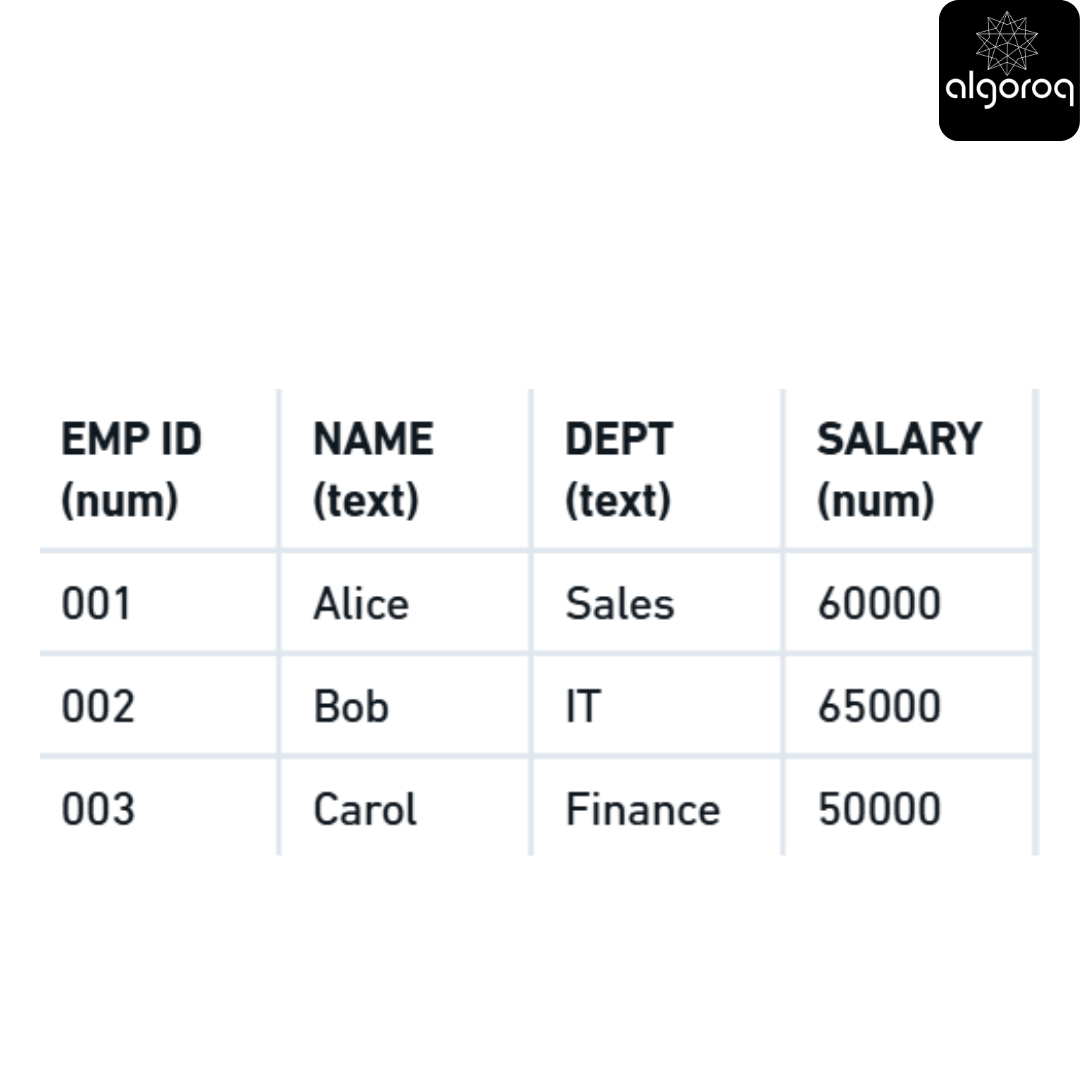
Characteristics:
- 🏗️ Fixed structure: Every employee MUST have these exact fields
- 🔗 Relationships: Can link to DEPARTMENTS table using Dept field
- 📋 Strict rules: Can't add "Favorite Color" unless you modify the entire table
- ✅ Perfect for: Banking, inventory, financial records, HR systems
NoSQL Database = Co-Working Space
Document Storage:
Characteristics:
- 🎨 Flexible structure: Each document can have different fields
- 🚀 Easy evolution: Add new fields anytime without restructuring
- 📦 Self-contained: Data stored together (less joining needed)
- ✅ Perfect for: Social media, IoT sensors, content management, real-time analytics
🎮 Decision Game: Which Database Do You Choose?
Scenario 1: You're building a banking app
- Need to track: account numbers, balances, transactions
- Must be 100% accurate (no money lost!)
- Accounts always have the same fields
- Need to see transaction history and account relationships
Your choice? Think about it...
Answer: SQL Database! ✓
Why?
- Banking needs ACID guarantees (we'll explore this next!)
- Fixed structure works perfectly (all accounts have same fields)
- Relationships are crucial (accounts → transactions → customers)
- Accuracy > flexibility
Scenario 2: You're building a social media feed
- Some posts have images, some videos, some just text
- Some have location tags, some don't
- New features added frequently (polls, stories, reactions)
- Millions of posts per day
- Need ultra-fast reads
Your choice? Think about it...
Answer: NoSQL Database! ✓
Why?
- Every post can have different fields (flexible!)
- Easy to add new features without restructuring
- Scales horizontally (add more servers easily)
- Optimized for fast reads at massive scale
🚨 Common Misconception: "NoSQL Means No Structure!"
You might think: "NoSQL = chaos, just dump data randomly!"
The truth: NoSQL still has structure, just flexible structure!
| Bad NoSQL approach:// Chaos ! Hard to work with
Good NoSQL approach: // Flexible but consistent!
Mental model: Think of SQL as a strict form you must fill out completely, and NoSQL as a flexible journal where each entry can be different but still meaningful!
📊 Visual Comparison Table
| Aspect | SQL | NoSQL |
|---|---|---|
| Structure | Fixed schema (tables, rows, columns) | Flexible schema (documents, key-value, graph) |
| Scaling | Vertical (bigger servers) | Horizontal (more servers) |
| Transactions | ACID compliant (strong consistency) | Eventually consistent (usually) |
| Best For | Complex queries, relationships, accuracy | Flexibility, speed, massive scale |
| Learning Curve | Steeper (need to learn SQL language) | Gentler (often uses JSON-like formats) |
| When to Use | Banking, ERP, CRM, inventory | Social media, IoT, real-time analytics, catalogs |
Real-world analogy:
- SQL: Like a meticulous accountant - precise, structured, perfect for financial records
- NoSQL: Like a creative scrapbook - flexible, fast, perfect for diverse content
Key Takeaways
- SQL databases enforce structure with schemas and support complex queries with JOINs — PostgreSQL, MySQL, and SQLite are the most popular
- NoSQL databases trade structure for flexibility and horizontal scalability — document (MongoDB), key-value (Redis), column-family (Cassandra), and graph (Neo4j)
- Use SQL when you need ACID transactions, complex queries, and data integrity — financial systems, e-commerce, and relational data
- Use NoSQL when you need flexible schemas, massive scale, or specific data models — real-time analytics, content management, and IoT
- Many modern systems use both (polyglot persistence) — SQL for transactional data, Redis for caching, Elasticsearch for search
Log in to keep reading
Create a free account to keep reading and track your progress.
Log in — it's free